Hello {{name}},
Your Bruno license key is ready:
{{licenseKey}}
Please keep this license key secure and do not share it with anyone.
If you have any questions, please contact our support team.
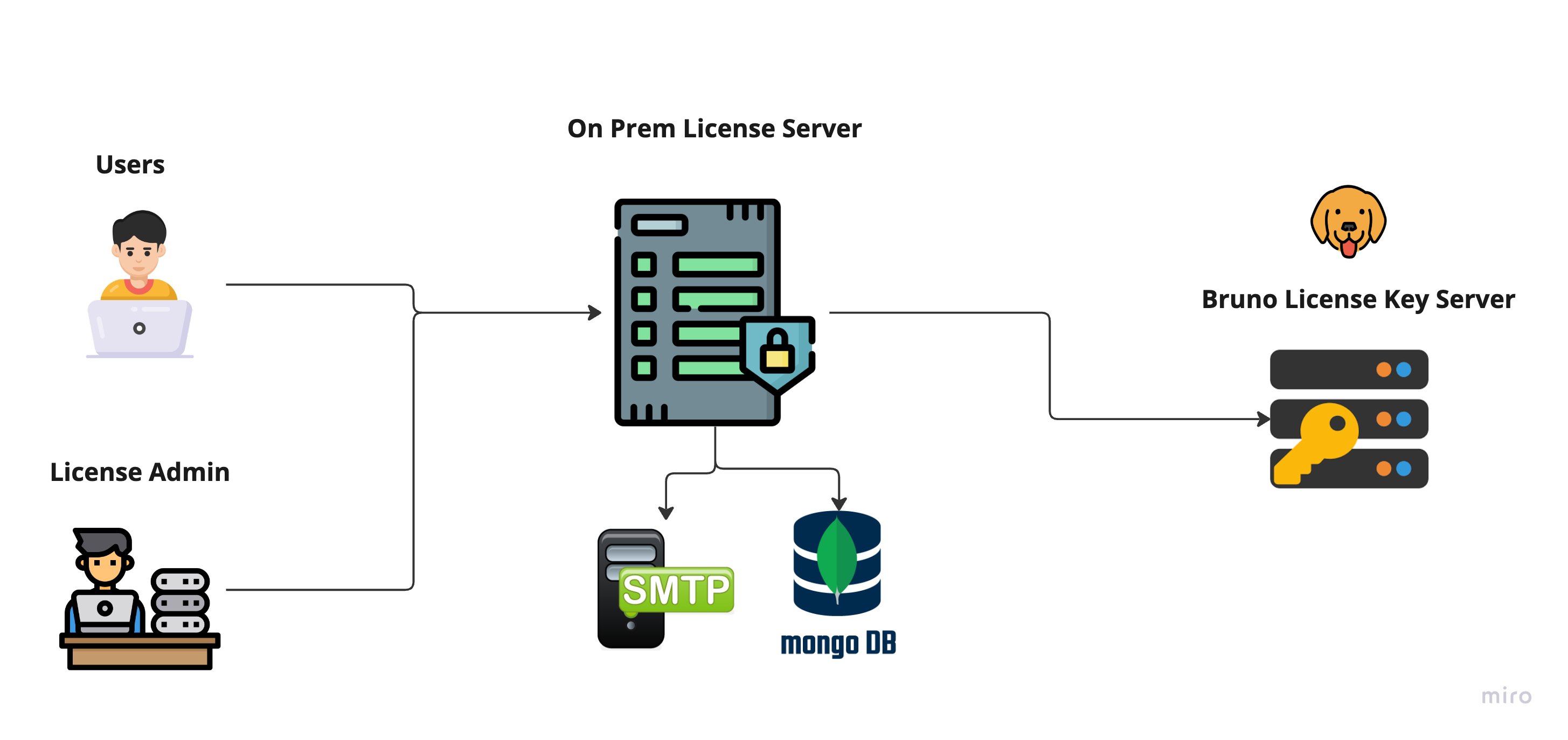 ***
## Setup Methods
The licensing server can be deployed in four ways. Choose the approach that fits your infrastructure:
1. [Running the Docker image directly](#1-setup-by-running-the-docker-image)
2. [Ansible](#2-setup-using-ansible)
3. [Docker Compose](#3-setup-using-docker-compose)
4. [Kubernetes](#4-setup-using-kubernetes)
***
### 1. Setup by Running the Docker Image
**Pull the image:**
```bash theme={null}
docker pull public.ecr.aws/e6d0f8t6/bruno-hosted-license-server
```
**Run the container:**
```bash theme={null}
docker run -d \
-e MONGODB_URI="{{ mongodb_uri }}" \
-e SMTP_HOST="{{ smtp_host }}" \
-e SMTP_PORT="{{ smtp_port }}" \
-e SMTP_USER="{{ smtp_user }}" \
-e SMTP_PASSWORD="{{ smtp_password }}" \
-e AUTH_JWT_SECRET="{{ random_uuid }}" \
-e BRUNO_GLOBAL_LICENSE_SERVER_URL="https://license-api.usebruno.com" \
-e PORT="80" \
-p 8080:80 \
public.ecr.aws/e6d0f8t6/bruno-hosted-license-server
```
***
### 2. Setup Using Ansible
```yaml theme={null}
- hosts: all
become: true
tasks:
- name: Pull Docker image for licensing server
docker_image:
name: public.ecr.aws/e6d0f8t6/bruno-hosted-license-server
source: pull
- name: Run the licensing server container
docker_container:
name: licensing_server
image: public.ecr.aws/e6d0f8t6/bruno-hosted-license-server
state: started
restart_policy: always
ports:
- "8080:8080"
env:
MONGODB_URI: "{{ mongodb_uri }}"
SMTP_HOST: "{{ smtp_host }}"
SMTP_PORT: "{{ smtp_port }}"
SMTP_USER: "{{ smtp_user }}"
SMTP_PASSWORD: "{{ smtp_pass }}"
AUTH_JWT_SECRET: "{{ random_uuid }}"
BRUNO_GLOBAL_LICENSE_SERVER_URL: "https://license-api.usebruno.com"
PORT: 80
```
***
### 3. Setup Using Docker Compose
**`docker-compose.yml`:**
```yaml theme={null}
version: '3'
services:
licensing-server:
image: public.ecr.aws/e6d0f8t6/bruno-hosted-license-server
ports:
- "8080:80"
environment:
MONGODB_URI: "your_mongodb_uri"
SMTP_HOST: "your_smtp_host"
SMTP_PORT: "your_smtp_port"
SMTP_USER: "your_smtp_user"
SMTP_PASSWORD: "your_smtp_password"
AUTH_JWT_SECRET: "{{ random_uuid }}"
BRUNO_GLOBAL_LICENSE_SERVER_URL: "https://license-api.usebruno.com"
PORT: 80
```
**Start the service:**
```bash theme={null}
docker-compose up -d
```
***
### 4. Setup Using Kubernetes
**Create the secret:**
```bash theme={null}
kubectl create secret generic licensing-server-secrets \
--from-literal=MONGODB_URI="your_mongodb_uri" \
--from-literal=SMTP_HOST="your_smtp_host" \
--from-literal=SMTP_PORT="your_smtp_port" \
--from-literal=SMTP_USER="your_smtp_user" \
--from-literal=SMTP_PASSWORD="your_smtp_password" \
--from-literal=BRUNO_GLOBAL_LICENSE_SERVER_URL="https://license-api.usebruno.com" \
--from-literal=AUTH_JWT_SECRET="random_uuid"
```
**`licensing-server.yaml` — Deployment and Service:**
```yaml theme={null}
apiVersion: apps/v1
kind: Deployment
metadata:
name: licensing-server
spec:
replicas: 1
selector:
matchLabels:
app: licensing-server
template:
metadata:
labels:
app: licensing-server
spec:
containers:
- name: licensing-server
image: usebruno/hosted-licensing-server
ports:
- containerPort: 8080
env:
- name: PORT
value: "80"
- name: MONGODB_URI
valueFrom:
secretKeyRef:
name: licensing-server-secrets
key: MONGODB_URI
- name: SMTP_HOST
valueFrom:
secretKeyRef:
name: licensing-server-secrets
key: SMTP_HOST
- name: SMTP_PORT
valueFrom:
secretKeyRef:
name: licensing-server-secrets
key: SMTP_PORT
- name: SMTP_USER
valueFrom:
secretKeyRef:
name: licensing-server-secrets
key: SMTP_USER
- name: SMTP_PASSWORD
valueFrom:
secretKeyRef:
name: licensing-server-secrets
key: SMTP_PASS
- name: BRUNO_GLOBAL_LICENSE_SERVER_URL
valueFrom:
secretKeyRef:
name: licensing-server-secrets
key: BRUNO_GLOBAL_LICENSE_SERVER_URL
- name: AUTH_JWT_SECRET
valueFrom:
secretKeyRef:
name: licensing-server-secrets
key: AUTH_JWT_SECRET
---
apiVersion: v1
kind: Service
metadata:
name: licensing-server
spec:
selector:
app: licensing-server
ports:
- protocol: TCP
port: 8080
targetPort: 8080
```
**Apply the manifest:**
```bash theme={null}
kubectl apply -f licensing-server.yaml
```
***
## Network Ports & Firewall Rules
| System / URL | Port | Description |
| ----------------------------------- | ----- | -------------------------------------------------------------------------------------------- |
| `https://license-api.usebruno.com/` | 443 | Required for the on-premises server to retrieve keys from the Bruno Global Licensing Server. |
| On-Prem License Server | 443 | Ensure port 443 is open on the machine hosting the on-premises server. |
| On-Prem MongoDB Server | 27017 | The on-premises server must be able to communicate with the MongoDB instance. |
***
## Proxy Settings
Pass the following environment variables to configure proxy settings:
| Variable | Value |
| --------------- | --------------- |
| `PROXY_ENABLED` | `true` |
| `HTTP_PROXY` | HTTP proxy URL |
| `HTTPS_PROXY` | HTTPS proxy URL |
***
## Troubleshooting SSL Issues
The following environment variables disable SSL validation when connecting to the Bruno Global Licensing Server.
***
## Setup Methods
The licensing server can be deployed in four ways. Choose the approach that fits your infrastructure:
1. [Running the Docker image directly](#1-setup-by-running-the-docker-image)
2. [Ansible](#2-setup-using-ansible)
3. [Docker Compose](#3-setup-using-docker-compose)
4. [Kubernetes](#4-setup-using-kubernetes)
***
### 1. Setup by Running the Docker Image
**Pull the image:**
```bash theme={null}
docker pull public.ecr.aws/e6d0f8t6/bruno-hosted-license-server
```
**Run the container:**
```bash theme={null}
docker run -d \
-e MONGODB_URI="{{ mongodb_uri }}" \
-e SMTP_HOST="{{ smtp_host }}" \
-e SMTP_PORT="{{ smtp_port }}" \
-e SMTP_USER="{{ smtp_user }}" \
-e SMTP_PASSWORD="{{ smtp_password }}" \
-e AUTH_JWT_SECRET="{{ random_uuid }}" \
-e BRUNO_GLOBAL_LICENSE_SERVER_URL="https://license-api.usebruno.com" \
-e PORT="80" \
-p 8080:80 \
public.ecr.aws/e6d0f8t6/bruno-hosted-license-server
```
***
### 2. Setup Using Ansible
```yaml theme={null}
- hosts: all
become: true
tasks:
- name: Pull Docker image for licensing server
docker_image:
name: public.ecr.aws/e6d0f8t6/bruno-hosted-license-server
source: pull
- name: Run the licensing server container
docker_container:
name: licensing_server
image: public.ecr.aws/e6d0f8t6/bruno-hosted-license-server
state: started
restart_policy: always
ports:
- "8080:8080"
env:
MONGODB_URI: "{{ mongodb_uri }}"
SMTP_HOST: "{{ smtp_host }}"
SMTP_PORT: "{{ smtp_port }}"
SMTP_USER: "{{ smtp_user }}"
SMTP_PASSWORD: "{{ smtp_pass }}"
AUTH_JWT_SECRET: "{{ random_uuid }}"
BRUNO_GLOBAL_LICENSE_SERVER_URL: "https://license-api.usebruno.com"
PORT: 80
```
***
### 3. Setup Using Docker Compose
**`docker-compose.yml`:**
```yaml theme={null}
version: '3'
services:
licensing-server:
image: public.ecr.aws/e6d0f8t6/bruno-hosted-license-server
ports:
- "8080:80"
environment:
MONGODB_URI: "your_mongodb_uri"
SMTP_HOST: "your_smtp_host"
SMTP_PORT: "your_smtp_port"
SMTP_USER: "your_smtp_user"
SMTP_PASSWORD: "your_smtp_password"
AUTH_JWT_SECRET: "{{ random_uuid }}"
BRUNO_GLOBAL_LICENSE_SERVER_URL: "https://license-api.usebruno.com"
PORT: 80
```
**Start the service:**
```bash theme={null}
docker-compose up -d
```
***
### 4. Setup Using Kubernetes
**Create the secret:**
```bash theme={null}
kubectl create secret generic licensing-server-secrets \
--from-literal=MONGODB_URI="your_mongodb_uri" \
--from-literal=SMTP_HOST="your_smtp_host" \
--from-literal=SMTP_PORT="your_smtp_port" \
--from-literal=SMTP_USER="your_smtp_user" \
--from-literal=SMTP_PASSWORD="your_smtp_password" \
--from-literal=BRUNO_GLOBAL_LICENSE_SERVER_URL="https://license-api.usebruno.com" \
--from-literal=AUTH_JWT_SECRET="random_uuid"
```
**`licensing-server.yaml` — Deployment and Service:**
```yaml theme={null}
apiVersion: apps/v1
kind: Deployment
metadata:
name: licensing-server
spec:
replicas: 1
selector:
matchLabels:
app: licensing-server
template:
metadata:
labels:
app: licensing-server
spec:
containers:
- name: licensing-server
image: usebruno/hosted-licensing-server
ports:
- containerPort: 8080
env:
- name: PORT
value: "80"
- name: MONGODB_URI
valueFrom:
secretKeyRef:
name: licensing-server-secrets
key: MONGODB_URI
- name: SMTP_HOST
valueFrom:
secretKeyRef:
name: licensing-server-secrets
key: SMTP_HOST
- name: SMTP_PORT
valueFrom:
secretKeyRef:
name: licensing-server-secrets
key: SMTP_PORT
- name: SMTP_USER
valueFrom:
secretKeyRef:
name: licensing-server-secrets
key: SMTP_USER
- name: SMTP_PASSWORD
valueFrom:
secretKeyRef:
name: licensing-server-secrets
key: SMTP_PASS
- name: BRUNO_GLOBAL_LICENSE_SERVER_URL
valueFrom:
secretKeyRef:
name: licensing-server-secrets
key: BRUNO_GLOBAL_LICENSE_SERVER_URL
- name: AUTH_JWT_SECRET
valueFrom:
secretKeyRef:
name: licensing-server-secrets
key: AUTH_JWT_SECRET
---
apiVersion: v1
kind: Service
metadata:
name: licensing-server
spec:
selector:
app: licensing-server
ports:
- protocol: TCP
port: 8080
targetPort: 8080
```
**Apply the manifest:**
```bash theme={null}
kubectl apply -f licensing-server.yaml
```
***
## Network Ports & Firewall Rules
| System / URL | Port | Description |
| ----------------------------------- | ----- | -------------------------------------------------------------------------------------------- |
| `https://license-api.usebruno.com/` | 443 | Required for the on-premises server to retrieve keys from the Bruno Global Licensing Server. |
| On-Prem License Server | 443 | Ensure port 443 is open on the machine hosting the on-premises server. |
| On-Prem MongoDB Server | 27017 | The on-premises server must be able to communicate with the MongoDB instance. |
***
## Proxy Settings
Pass the following environment variables to configure proxy settings:
| Variable | Value |
| --------------- | --------------- |
| `PROXY_ENABLED` | `true` |
| `HTTP_PROXY` | HTTP proxy URL |
| `HTTPS_PROXY` | HTTPS proxy URL |
***
## Troubleshooting SSL Issues
The following environment variables disable SSL validation when connecting to the Bruno Global Licensing Server.
Hello {{name}},
Your Bruno license key is ready:
Please keep this license key secure and do not share it with anyone.
If you have any questions, please contact our support team.
© {{currentYear}} {{orgName}}. Powered by Bruno.
''' ``` ### Available Template Variables | Variable | Description | Example | | ----------------- | --------------------------------------------- | --------------------- | | `{{licenseKey}}` | The generated license key | `XXXX-XXXX-XXXX-XXXX` | | `{{orgName}}` | Organization name | `Your Corporation` | | `{{email}}` | User's email address | `user@example.com` | | `{{name}}` | User's name | `John Doe` | | `{{currentYear}}` | Current year | `2025` | | `{{otp}}` | One-Time Password for login (OTP emails only) | `123456` | ### Template File Structure Mount your custom templates using the following structure: ``` templates/ ├── license-activation.toml ├── license-deactivation.toml └── otp-email.toml ``` | Purpose | File Name | | -------------------- | --------------------------- | | License Activation | `license-activation.toml` | | License Deactivation | `license-deactivation.toml` | | OTP Login Email | `otp-email.toml` | **Mount templates when starting the container:** ```bash theme={null} docker run -d \ -e MONGODB_URI="{{ mongodb_uri }}" \ -e SMTP_HOST="{{ smtp_host }}" \ -e SMTP_PORT="{{ smtp_port }}" \ -e SMTP_USER="{{ smtp_user }}" \ -e SMTP_PASSWORD="{{ smtp_password }}" \ -e AUTH_JWT_SECRET="{{ random_uuid }}" \ -e BRUNO_GLOBAL_LICENSE_SERVER_URL="https://license-api.usebruno.com" \ -e PORT="80" \ -p 8080:80 \ -v ~/templates:/opt/license-service/templates \ public.ecr.aws/e6d0f8t6/bruno-hosted-license-server ``` ### Template Fallback Behavior If a custom template is missing or cannot be parsed, the server automatically falls back to the default Bruno template for that notification type. Template usage and fallback events are logged at startup and runtime. ### Built-In Template ExamplesHello {{name}},
Your Bruno license key is ready:
Please keep this license key secure and do not share it with anyone.
If you have any questions, please contact our support team.
Your Bruno license has been deactivated.
This means you will no longer have access to Bruno's premium features.
If you believe this was a mistake, please contact your License Administrator or software licensing team.
Your One-Time Password (OTP) for logging into Bruno License Manager is:
This OTP is valid for 10 minutes. Please do not share it with anyone.
If you didn't request this OTP, please ignore this email.
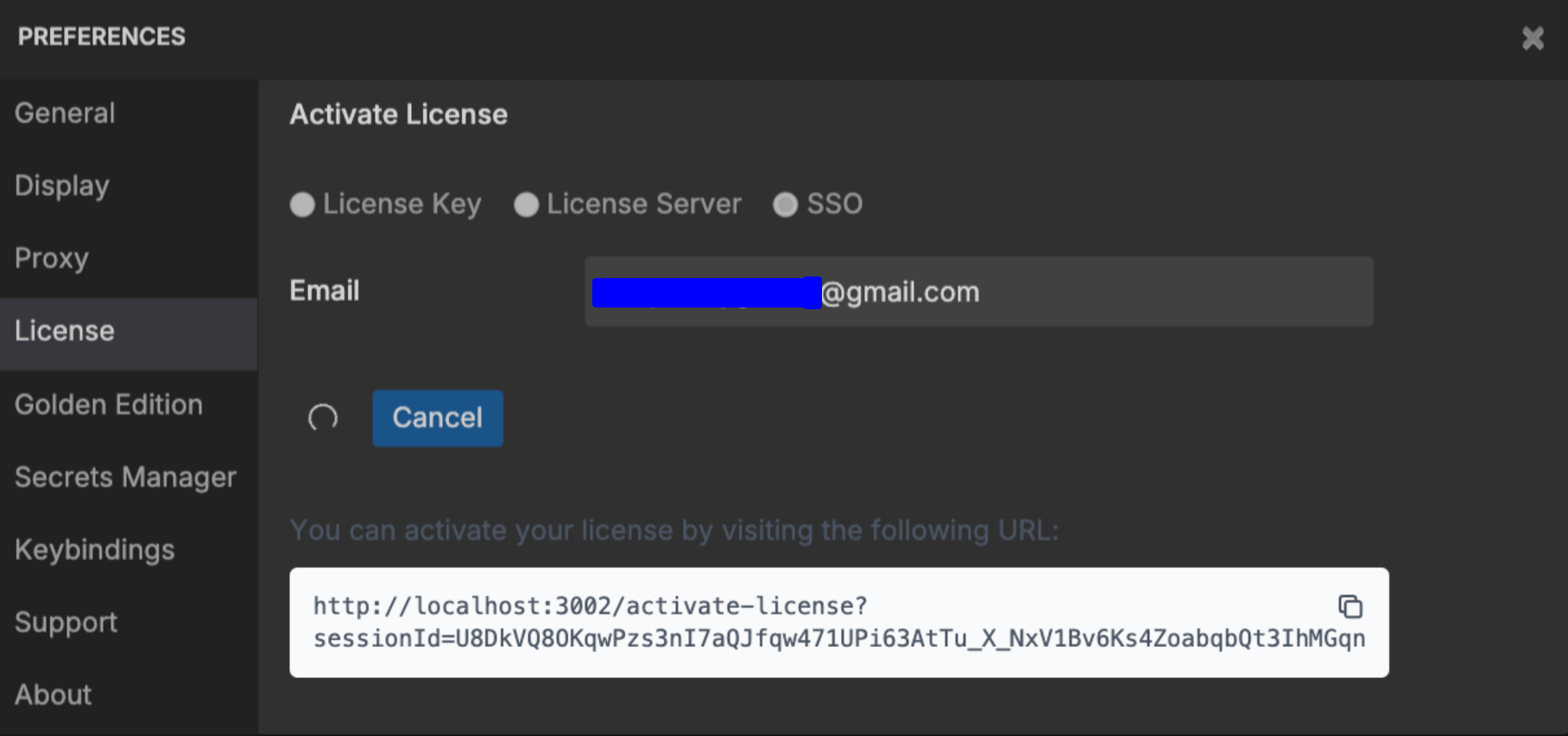 2. You will be redirected to the SSO login page. If `SSO_ENABLED=true`, a **Login with SSO** button will appear.
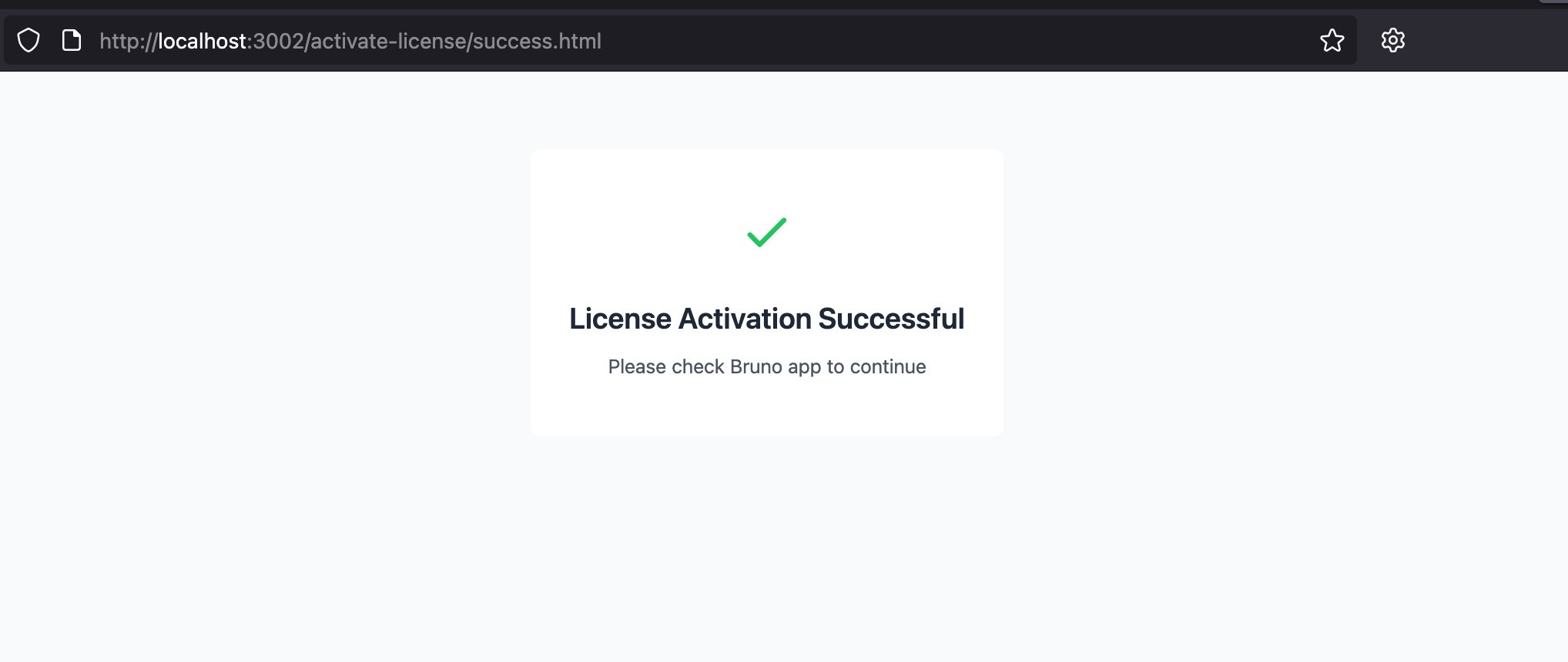
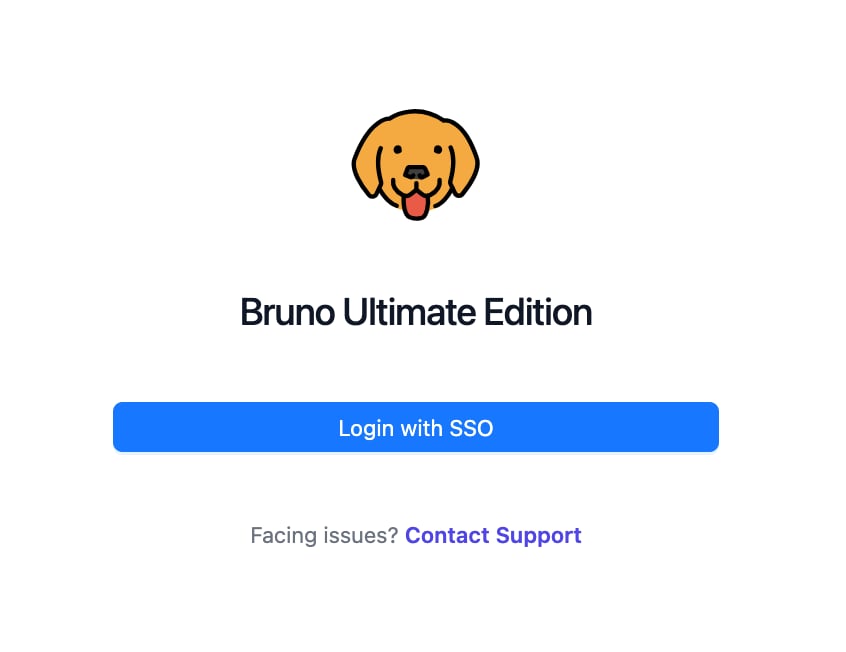 3. After logging in through your IdP, users with the `bruno-license-user` role will be granted access and see the activation confirmation page.
 ***
## Changelog
Release history for the Bruno Self-Hosted Licensing Server.
### 1.17.0 (30 March 2026)
* Display the app version in the admin dashboard
### 1.16.2 (2 March 2026)
* Fixed issue where license activation details were not persisted after restarting the app
### 1.16.1 (19 February 2026)
* Fixed license activation issue
### 1.16.0 (6 February 2026)
* Added user activation logs
* Added dynamic version logs
* Fixed issue with Docker image updates for default templates
### 1.15.2 (16 January 2026)
* Fixed issue with Docker image updates
### 1.15.1 (14 January 2026)
* Fixed session handling for SSO
### 1.15.0 (9 January 2026)
* Added refresh option for the license information
### 1.14.0 (1 January 2026)
* Added CSV export support for user data
### 1.13.0 (4 November 2025)
* Added SCIM support in SSO integration for automated user provisioning and enhanced identity management
### 1.12.1 (17 October 2025)
* Fixed duplicate license activation page after successful login
### 1.12.0 (7 August 2025)
* Support for customizing License Activation, Deactivation, and OTP emails
### 1.11.0 (8 July 2025)
* Support for in-app license activation using SSO
* Users are now notified via email upon deactivation
### 1.10.1 (10 June 2025)
* Parse Group/Role attributes with list of values (SSO)
### 1.10.0 (29 May 2025)
* License keys are masked in the UI
* Seat usage is now displayed in the UI
### 1.9.3 (22 May 2025)
* Retrieve role info from Groups attribute and validate accordingly (SAML, SSO)
### 1.9.2 (9 May 2025)
* Made Assertion signature non-mandatory (Response signature is required) for SSO
### 1.9.1 (17 April 2025)
* Fixed issue related to duplicate user during upload
### 1.9.0 (4 April 2025)
* SSO support for License Admins
### 1.8.0 (28 March 2025)
* SSL certificate configuration support
### 1.7.0 (26 November 2024)
* Status API — `/api/v1/status`
***
## Changelog
Release history for the Bruno Self-Hosted Licensing Server.
### 1.17.0 (30 March 2026)
* Display the app version in the admin dashboard
### 1.16.2 (2 March 2026)
* Fixed issue where license activation details were not persisted after restarting the app
### 1.16.1 (19 February 2026)
* Fixed license activation issue
### 1.16.0 (6 February 2026)
* Added user activation logs
* Added dynamic version logs
* Fixed issue with Docker image updates for default templates
### 1.15.2 (16 January 2026)
* Fixed issue with Docker image updates
### 1.15.1 (14 January 2026)
* Fixed session handling for SSO
### 1.15.0 (9 January 2026)
* Added refresh option for the license information
### 1.14.0 (1 January 2026)
* Added CSV export support for user data
### 1.13.0 (4 November 2025)
* Added SCIM support in SSO integration for automated user provisioning and enhanced identity management
### 1.12.1 (17 October 2025)
* Fixed duplicate license activation page after successful login
### 1.12.0 (7 August 2025)
* Support for customizing License Activation, Deactivation, and OTP emails
### 1.11.0 (8 July 2025)
* Support for in-app license activation using SSO
* Users are now notified via email upon deactivation
### 1.10.1 (10 June 2025)
* Parse Group/Role attributes with list of values (SSO)
### 1.10.0 (29 May 2025)
* License keys are masked in the UI
* Seat usage is now displayed in the UI
### 1.9.3 (22 May 2025)
* Retrieve role info from Groups attribute and validate accordingly (SAML, SSO)
### 1.9.2 (9 May 2025)
* Made Assertion signature non-mandatory (Response signature is required) for SSO
### 1.9.1 (17 April 2025)
* Fixed issue related to duplicate user during upload
### 1.9.0 (4 April 2025)
* SSO support for License Admins
### 1.8.0 (28 March 2025)
* SSL certificate configuration support
### 1.7.0 (26 November 2024)
* Status API — `/api/v1/status`